
SHT40 ESP32 Wiring Guide: I2C Connection, Arduino Code and Troubleshooting
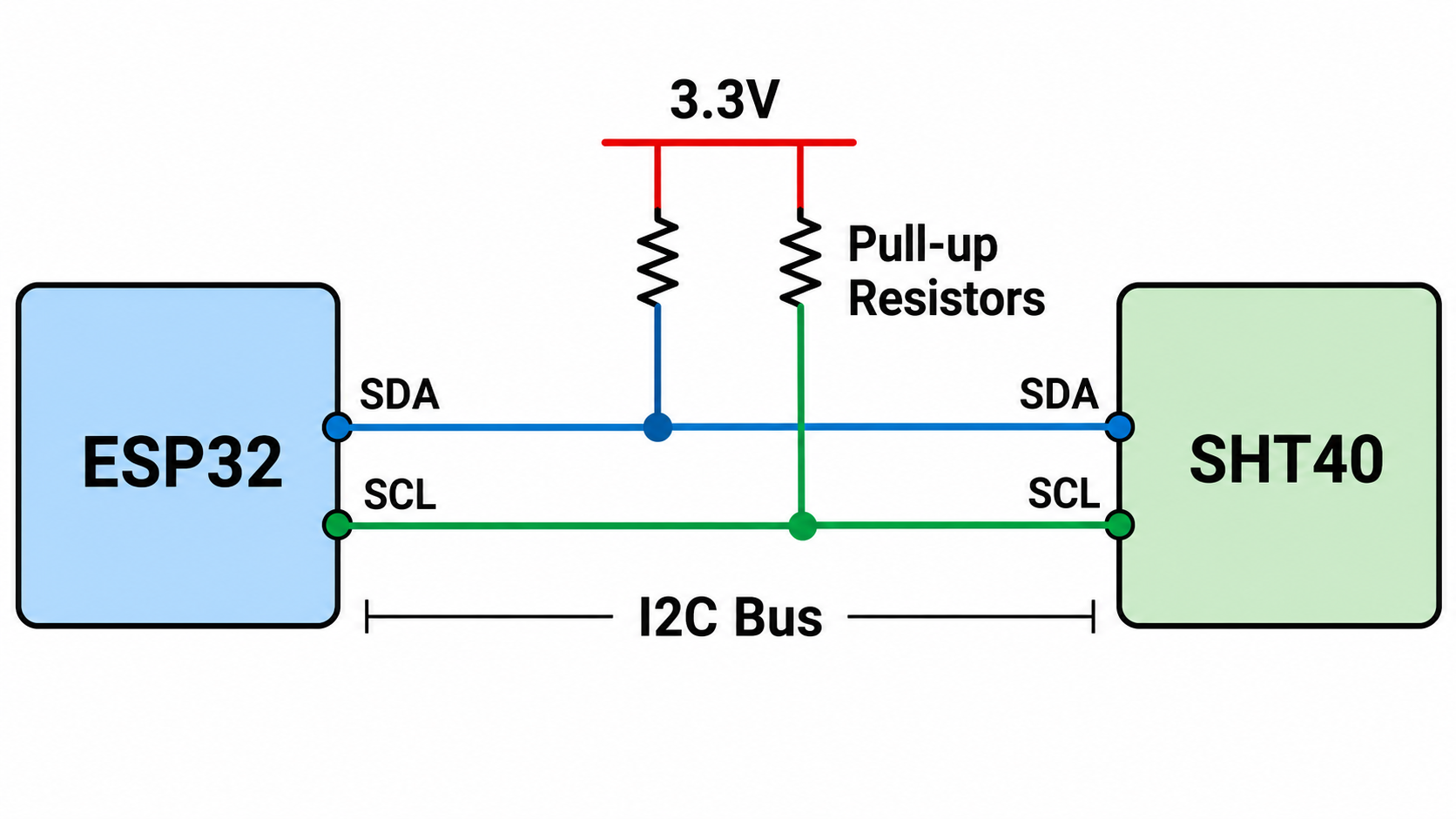
Direct answer. For a classic ESP32 DevKit, connect SHT40 to ESP32 through I2C: VDD to 3.3 V, GND to GND, SDA to GPIO21 and SCL to GPIO22. The most common SHT40 I2C address is 0x44.
- Use
Wire.begin(21, 22)for the classic ESP32 wiring shown in this guide. - For ESP32-S3 and ESP32-C3, replace 21 and 22 with the SDA/SCL pins from the exact board pinout.
- If the sensor is not detected, run the I2C scanner before debugging the measurement code.

Quick Setup Summary
The table below gives the practical setup for connecting an SHT40 sensor to ESP32 before moving into code and troubleshooting.
| Item | Recommended Setup | Notes |
|---|---|---|
| Power | 3.3 V | Do not power a bare SHT40 IC from 5 V. |
| I2C address | 0x44 is most common | Check the exact part number for other factory-configured addresses. |
| Classic ESP32 SDA | GPIO21 | Use Wire.begin(21, 22). |
| Classic ESP32 SCL | GPIO22 | Use board-specific pins on ESP32-S3 and ESP32-C3. |
| First debug step | Run I2C scanner | Confirms whether the sensor responds on the bus. |
| Expected output | Temperature in °C and humidity in %RH | Use stable airflow and keep the sensor away from board heat. |
What is the SHT40 Temperature Humidity Sensor?
The SHT40 is a compact digital temperature and relative humidity sensor that communicates through I2C. It is commonly used in IoT environmental monitoring, smart home devices, HVAC monitoring, data loggers and embedded systems that need digital humidity and temperature data.
For engineers selecting a compact temperature and humidity sensor for an ESP32-based design, NYFEA's FHT40 digital temperature and humidity sensor is an SHT40-class option for environmental sensing applications.
SHT40 Key Specifications for ESP32 Projects
These values are typical SHT40 reference specifications. For production design, always verify the exact sensor part number, breakout board and operating conditions.
| Parameter | Typical SHT40 Value | Why It Matters |
|---|---|---|
| Interface | I2C | Works with ESP32 SDA and SCL pins |
| Supply voltage | 1.08 V to 3.6 V | Compatible with 3.3 V ESP32 systems |
| Typical RH accuracy | ±1.8 %RH | Helps estimate humidity measurement error |
| Typical temperature accuracy | ±0.2 °C | Helps estimate temperature measurement error |
| Operating RH range | 0 to 100 %RH | Defines usable humidity measurement range |
| Operating temperature range | -40 °C to +125 °C | Defines the sensor operating environment |
| Package size | 1.5 mm × 1.5 mm × 0.5 mm | Useful for compact PCB design |

SHT40 ESP32 Wiring Connection
The SHT40 uses a standard I2C connection. On many classic ESP32 development boards, GPIO21 and GPIO22 are commonly used as SDA and SCL. If your board labels different I2C pins, use those board-specific pins and update the code.
| SHT40 Pin | Classic ESP32 Pin | Function |
|---|---|---|
| VDD | 3.3 V | Power supply |
| GND | GND | Ground |
| SDA | GPIO21 | I2C data |
| SCL | GPIO22 | I2C clock |
Place the sensor away from the ESP32 module, voltage regulator and other heat sources. Board heat can make the measured temperature higher than the actual ambient temperature.
SHT40 I2C Address
The most common SHT40 I2C address is 0x44. Some SHT40 variants may use other factory-configured I2C addresses such as 0x45 or 0x46, so check the exact part number or module documentation before production use.
If the ESP32 cannot detect the sensor, run an I2C scanner first. A detected address confirms that a device responded on the bus, but it does not prove that temperature and humidity measurements are already valid.
ESP32, ESP32-S3 and ESP32-C3 I2C Pin Notes
ESP32 boards can usually assign I2C to different GPIO pins in software. GPIO21 for SDA and GPIO22 for SCL are common on many classic ESP32 development boards, while ESP32-S3 and ESP32-C3 boards often use board-specific pin assignments.
| Board type | Common SDA pin | Common SCL pin | Code pattern |
|---|---|---|---|
| Classic ESP32 DevKit | GPIO21 | GPIO22 | Wire.begin(21, 22); |
| ESP32-S3 | Board dependent | Board dependent | Wire.begin(SDA_PIN, SCL_PIN); |
| ESP32-C3 | Board dependent | Board dependent | Wire.begin(SDA_PIN, SCL_PIN); |
For ESP32-S3 and ESP32-C3, check the exact development board pinout before wiring the SHT40 sensor. If the board silkscreen labels SDA and SCL, use those pins first.
ESP32 Arduino Code for SHT40
The following Arduino example reads temperature and humidity data from SHT40 through the ESP32 I2C interface. It uses GPIO21 as SDA and GPIO22 as SCL for the classic ESP32 wiring shown above. If you use ESP32-S3 or ESP32-C3, replace these pin numbers with the pins from your board.
#include <Wire.h>
#include "Adafruit_SHT4x.h"

Adafruit_SHT4x sht4 = Adafruit_SHT4x();

void setup() {
  Serial.begin(115200);
  Wire.begin(21, 22);

  if (!sht4.begin()) {
    Serial.println("SHT40 not found");
    while (1);
  }

  Serial.println("SHT40 sensor detected");
}

void loop() {
  sensors_event_t humidity, temp;
  sht4.getEvent(&humidity, &temp);

  Serial.print("Temperature: ");
  Serial.print(temp.temperature);
  Serial.println(" C");

  Serial.print("Humidity: ");
  Serial.print(humidity.relative_humidity);
  Serial.println(" %RH");

  delay(1000);
}
Advanced: CRC-Checked SHT40 Reading Code
The simple library example above is enough for most projects. For engineering validation, the SHT40 response can also be checked manually. The high precision command 0xFD returns six bytes: two temperature bytes, one temperature CRC byte, two humidity bytes and one humidity CRC byte.
Show CRC-checked Arduino code
This example checks both CRC bytes before converting the raw SHT40 signal into temperature and relative humidity. It uses CRC-8 with polynomial 0x31 and initial value 0xFF.
#include <Wire.h>

const uint8_t SHT40_ADDR = 0x44;
const int SDA_PIN = 21;
const int SCL_PIN = 22;

uint8_t sht40Crc8(const uint8_t *data, int len) {
  uint8_t crc = 0xFF;

  for (int i = 0; i < len; i++) {
    crc ^= data[i];

    for (int bit = 0; bit < 8; bit++) {
      if (crc & 0x80) {
        crc = (crc << 1) ^ 0x31;
      } else {
        crc <<= 1;
      }
    }
  }

  return crc;
}

bool readSHT40(float &temperatureC, float &humidityRH) {
  Wire.beginTransmission(SHT40_ADDR);
  Wire.write(0xFD);  // high precision measurement command

  if (Wire.endTransmission() != 0) {
    return false;
  }

  delay(20);

  if (Wire.requestFrom((int)SHT40_ADDR, 6) != 6) {
    return false;
  }

  uint8_t data[6];
  for (int i = 0; i < 6; i++) {
    data[i] = Wire.read();
  }

  if (sht40Crc8(data, 2) != data[2]) {
    Serial.println("Temperature CRC failed");
    return false;
  }

  if (sht40Crc8(&data[3], 2) != data[5]) {
    Serial.println("Humidity CRC failed");
    return false;
  }

  uint16_t rawT = ((uint16_t)data[0] << 8) | data[1];
  uint16_t rawRH = ((uint16_t)data[3] << 8) | data[4];

  temperatureC = -45.0f + 175.0f * (float)rawT / 65535.0f;
  humidityRH = -6.0f + 125.0f * (float)rawRH / 65535.0f;

  if (humidityRH > 100.0f) humidityRH = 100.0f;
  if (humidityRH < 0.0f) humidityRH = 0.0f;

  return true;
}

void setup() {
  Serial.begin(115200);
  Wire.begin(SDA_PIN, SCL_PIN);
}

void loop() {
  float temperatureC;
  float humidityRH;

  if (readSHT40(temperatureC, humidityRH)) {
    Serial.print("Temperature: ");
    Serial.print(temperatureC);
    Serial.println(" C");

    Serial.print("Humidity: ");
    Serial.print(humidityRH);
    Serial.println(" %RH");
  } else {
    Serial.println("SHT40 measurement failed");
  }

  delay(1000);
}
Use this advanced version when a project needs to distinguish a wiring problem from a corrupted measurement frame. If the I2C scanner finds 0x44 but CRC fails, the bus can acknowledge the address but the measurement data should not be trusted.
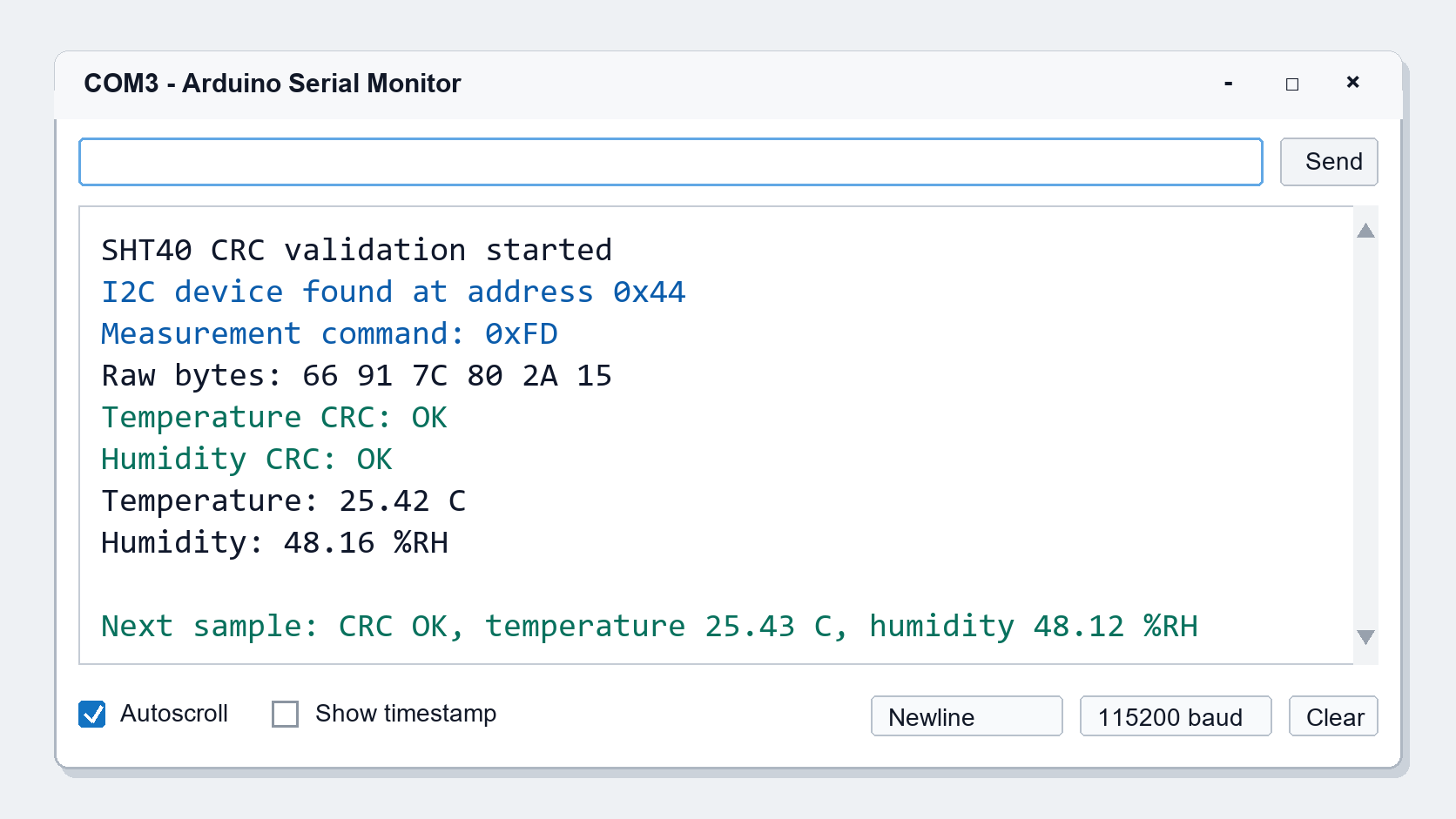
0xFD, CRC status and converted temperature and humidity values.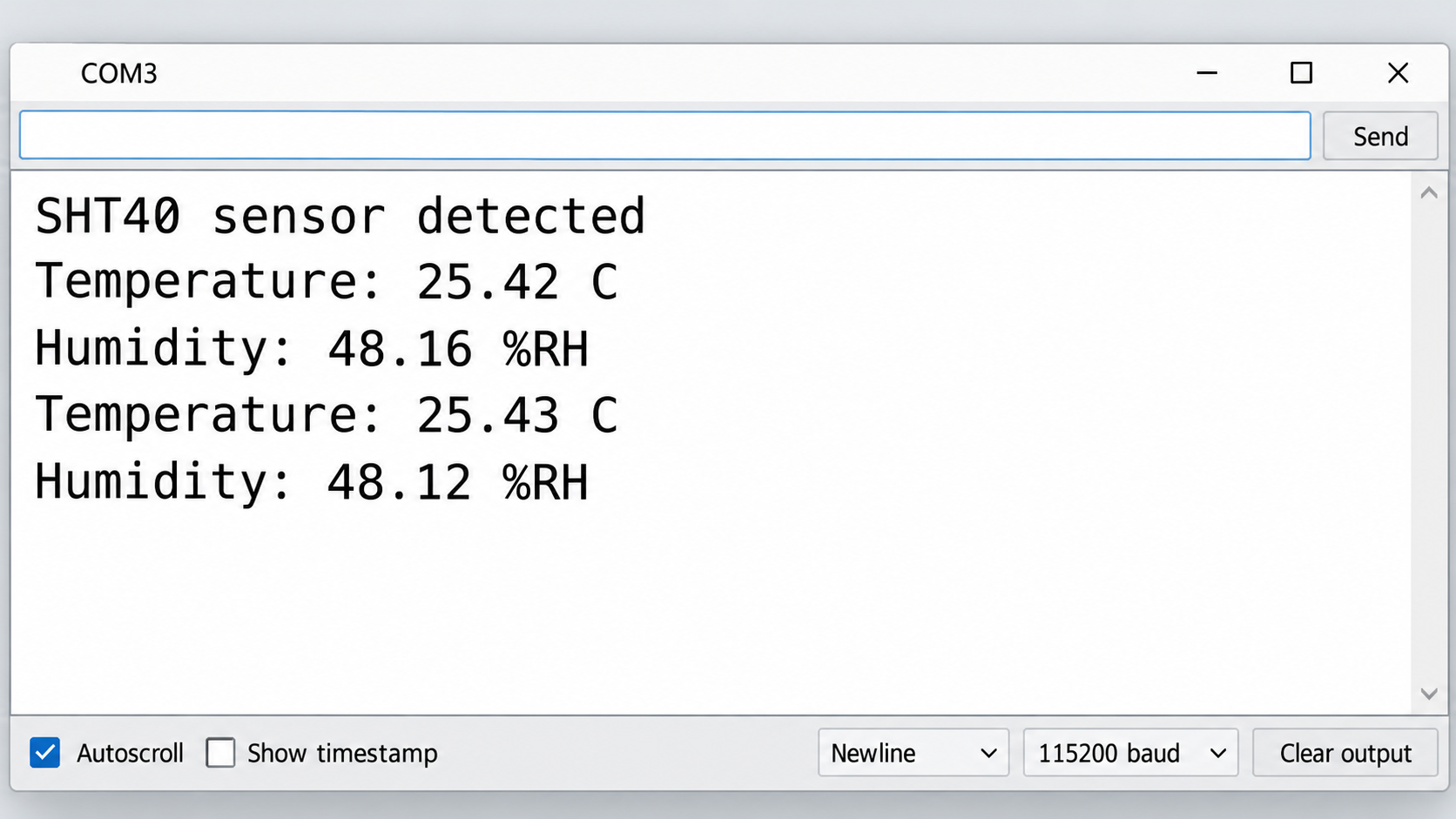
I2C Scanner Code for SHT40 and ESP32
Before running the measurement sketch, use an I2C scanner to confirm that the ESP32 can detect the SHT40 on the bus. This is especially useful when using ESP32-S3 or ESP32-C3 boards with different I2C pins.
#include <Wire.h>

const int SDA_PIN = 21;
const int SCL_PIN = 22;

void setup() {
  Serial.begin(115200);
  Wire.begin(SDA_PIN, SCL_PIN);
  Serial.println("I2C scanner started");
}

void loop() {
  byte error;
  byte address;
  int devices = 0;

  for (address = 1; address < 127; address++) {
    Wire.beginTransmission(address);
    error = Wire.endTransmission();

    if (error == 0) {
      Serial.print("I2C device found at address 0x");
      if (address < 16) {
        Serial.print("0");
      }
      Serial.println(address, HEX);
      devices++;
    }
  }

  if (devices == 0) {
    Serial.println("No I2C devices found");
  }

  delay(3000);
}
If the scanner reports 0x44, the ESP32 has detected a device at the common SHT40 address. If no address appears, check power, ground, SDA, SCL, pull-up resistors and the pin numbers in Wire.begin().
Troubleshooting SHT40 ESP32 Communication Problems
Start with the symptom you see in the serial monitor, then check the wiring, I2C pins and sensor placement before changing the code.
| Symptom | Likely Cause | What to Check |
|---|---|---|
| SHT40 not detected | Wrong SDA/SCL order, no common ground, unstable 3.3 V power or wrong pins in code | Check VDD, GND, SDA, SCL and confirm Wire.begin(SDA_PIN, SCL_PIN) matches the actual wiring. |
| I2C scanner shows no device | Bus wiring or pull-up issue | Use short wires, check breadboard contact and confirm SDA/SCL pull-up resistors are present on the module or PCB. |
I2C scanner finds 0x44, but readings fail | Address ACK works, but measurement code or library initialization fails | Use a compatible SHT4x library, confirm the correct command flow and check serial error messages. |
| Temperature reading is too high | Sensor is heated by the ESP32 module, regulator, USB interface or enclosure | Move the sensor away from heat sources and allow airflow around the sensing area. |
| Humidity reading is unstable | Condensation, airflow disturbance, long wires or unstable environment | Use short I2C wiring, avoid condensation and allow the sensor to stabilize before logging data. |
| ESP32-S3 or ESP32-C3 does not work with copied code | Different board-specific I2C pins | Replace GPIO21/GPIO22 with the SDA and SCL pins from the exact board pinout. |
SHT40 ESP32 Applications
SHT40 with ESP32 is suitable for Wi-Fi environmental monitoring, smart thermostats, indoor air quality devices, HVAC monitoring, greenhouse sensing and industrial temperature humidity data logging. In each case, sensor placement and airflow are just as important as the wiring and code.

FAQ About SHT40 ESP32
How do I connect SHT40 to ESP32?
Connect SHT40 VDD to ESP32 3.3 V, GND to GND, SDA to GPIO21 and SCL to GPIO22 on a classic ESP32 DevKit. For ESP32-S3 and ESP32-C3, check the exact board pinout and set the SDA and SCL pins in the code.
What is the SHT40 I2C address?
The most common SHT40 I2C address is 0x44. Some SHT40 variants support factory-configured addresses such as 0x45 or 0x46, so check the exact part number or module documentation.
Which ESP32 pins should I use for SHT40 SDA and SCL?
For many classic ESP32 DevKit boards, use GPIO21 for SDA and GPIO22 for SCL. For ESP32-S3, ESP32-C3 and custom boards, use the pins marked SDA/SCL on the board or define two suitable GPIO pins in Wire.begin(SDA_PIN, SCL_PIN).
Can SHT40 work with Arduino IDE?
Yes. SHT40 can be used in Arduino IDE through the I2C interface. A common approach is to install a supported SHT4x library, initialize I2C with the correct SDA and SCL pins, and read temperature and humidity events in the loop.
Why is my ESP32 not detecting the SHT40 sensor?
Common causes include reversed SDA/SCL wires, no common ground, unstable 3.3 V power, loose breadboard contacts, missing I2C pull-up resistors, or code using pin numbers that do not match the board wiring.
Why does the I2C scanner find 0x44 but the SHT40 reading still fails?
An I2C scan only confirms that a device acknowledged an address. A valid SHT40 reading still requires sending the measurement command, waiting for conversion, reading the response bytes and using a compatible library or correct conversion logic.
Why should SHT40 code check CRC?
CRC checking confirms that the temperature and humidity bytes returned by SHT40 were received correctly. If CRC fails, the ESP32 may still see the I2C address, but the measurement frame should not be used as valid data.
Can I power SHT40 from the ESP32 5V pin?
Do not power a bare SHT40 IC from 5 V. The SHT4x sensor supply range is 1.08 V to 3.6 V. Some breakout boards may include voltage regulation, but you must confirm the exact module specification before using 5 V.
Does SHT40 need I2C pull-up resistors?
Yes, I2C SDA and SCL lines need pull-up resistors. Many SHT40 breakout modules already include them, but a bare sensor IC or custom PCB design must provide suitable pull-ups for the selected bus voltage and speed.
Why is the SHT40 temperature reading higher than room temperature?
The sensor may be too close to the ESP32 module, voltage regulator, USB interface or enclosure heat source. Move the sensor away from heat-generating parts and allow airflow around the sensing area before comparing readings.
Can ESP32-S3 or ESP32-C3 use the same SHT40 code?
Yes, but the I2C pin numbers may be different. Define the correct SDA and SCL pins for the exact board and call Wire.begin(SDA_PIN, SCL_PIN) before initializing the SHT40 library.
Can multiple I2C sensors share the same ESP32 bus with SHT40?
Yes, multiple I2C devices can share the same SDA and SCL lines if their addresses do not conflict and the bus wiring is stable. If another device uses the same address, use a different sensor variant, an I2C multiplexer or a separate bus.
What is the typical accuracy of SHT40?
Typical SHT40 specifications are about ±1.8 %RH for relative humidity and ±0.2 °C for temperature under datasheet conditions. Final product accuracy still depends on PCB layout, enclosure design, airflow, heat sources and calibration method.
Choose an SHT40-Class Sensor for ESP32 Environmental Monitoring
For compact IoT devices, smart home equipment and industrial monitoring systems, NYFEA provides the FHT40 digital temperature and humidity sensor for environmental sensing designs that need a compact I2C interface.
View FHT40 Temperature and Humidity SensorContact NYFEA Engineering