
SHT41 ENGINEERING GUIDE
Can You Power an SHT41 from 5V? Check Your Board First
You have a 5V controller, an I²C display, and a new SHT41 module. The listing says “5V compatible,” but the sensor datasheet specifies a lower voltage. Before connecting the wires, you need to establish whether that label describes the chip or the circuit around it.
A standard SHT41-AD1B requires 1.08–3.6V and must not receive 5V directly. A module may accept 5V at its input when its circuitry supports it. Check the input rating and the voltage reaching SDA and SCL separately. Sensirion SHT41 specifications
Check the complete part number. This walkthrough covers SHT41-AD1B. The automotive SHT41A-AWSB has a different specified supply range, 2.3–5.5V. Its rating must not be applied to the standard device. SHT41A-AWSB datasheet, version 1.0
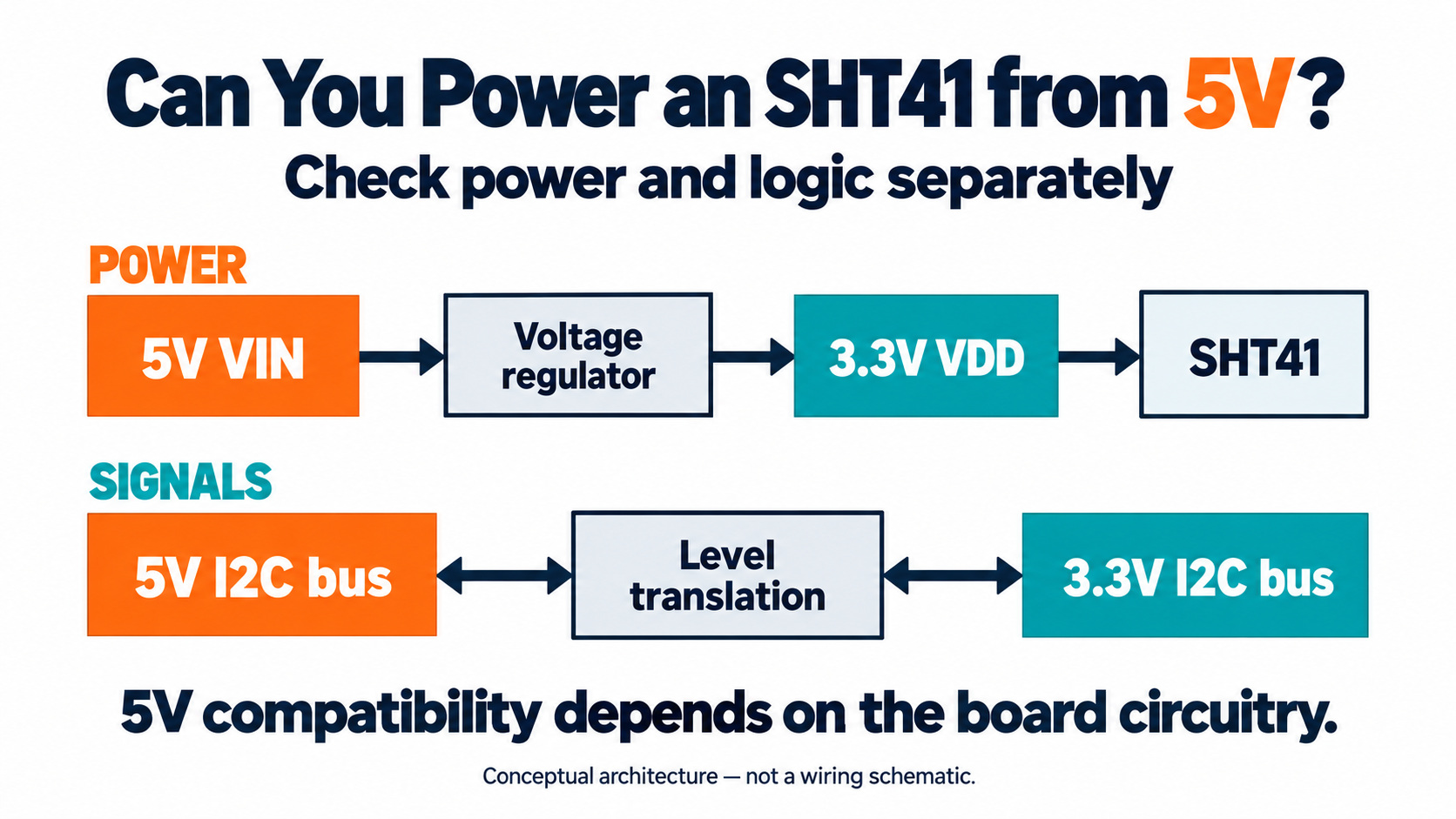
How can you tell whether your SHT41 board accepts 5V?
Start with the exact model, PCB revision, and schematic. Trace two paths: the supply from the connector to the sensor, and the signals from the controller to SDA and SCL. A “5V” label does not establish the rating of every pin.
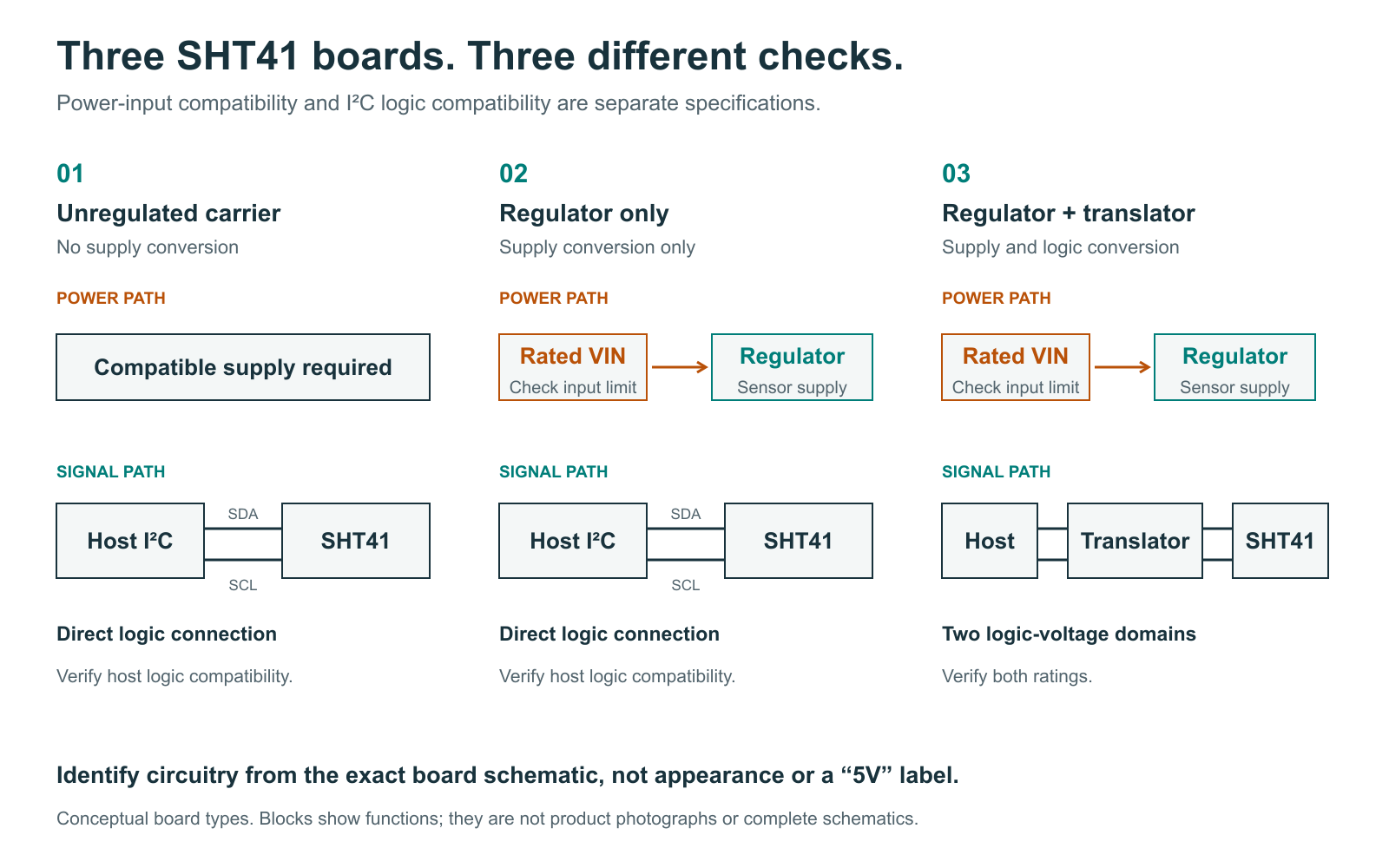
Functional categories for SHT41-AD1B boards, not photographs of identified products.
| Identified board | Can its input receive 5V? | Can it connect to a 5V I²C bus? | Decision |
|---|---|---|---|
| Bare SHT41-AD1B or unregulated carrier | No | Not directly | Provide compatible power and logic |
| Module with a regulator only | Only if its input is rated for it | Regulation alone does not establish compatibility | Check signal routing and pull-up rails |
| Regulated module with I²C translation | Follow its documented input rating | Follow its host-side rating | Verify wiring before power-up |
| Unidentified board | Unknown | Unknown | Obtain documentation before connecting |
A component that looks like a regulator is not sufficient evidence. Ask the supplier to identify its output, signal translators, and pull-up connections. A pin marked “3Vo” may be an output rather than a 5V input.
Adafruit’s SHT41 breakout documents regulation and level-shifted I²C pins. Its instructions distinguish VIN from the 3V output and specify matching VIN to the host logic supply. This applies to that documented board. Adafruit pinout guide
Why can a 3.3V-powered SHT41 still face a 5V problem?
Suppose your regulator supplies the sensor correctly, but the existing display pulls SDA and SCL up to 5V. The signal lines can still expose the standard SHT41 to excessive voltage. Changing the sensor supply does not automatically change the shared bus.
I²C devices release the lines for a high state; pull-up resistors establish that voltage. Check the pull-ups on every connected board. Parallel pull-ups also change the effective resistance, affecting rise time and the current a device must sink. TI I²C pull-up design guide
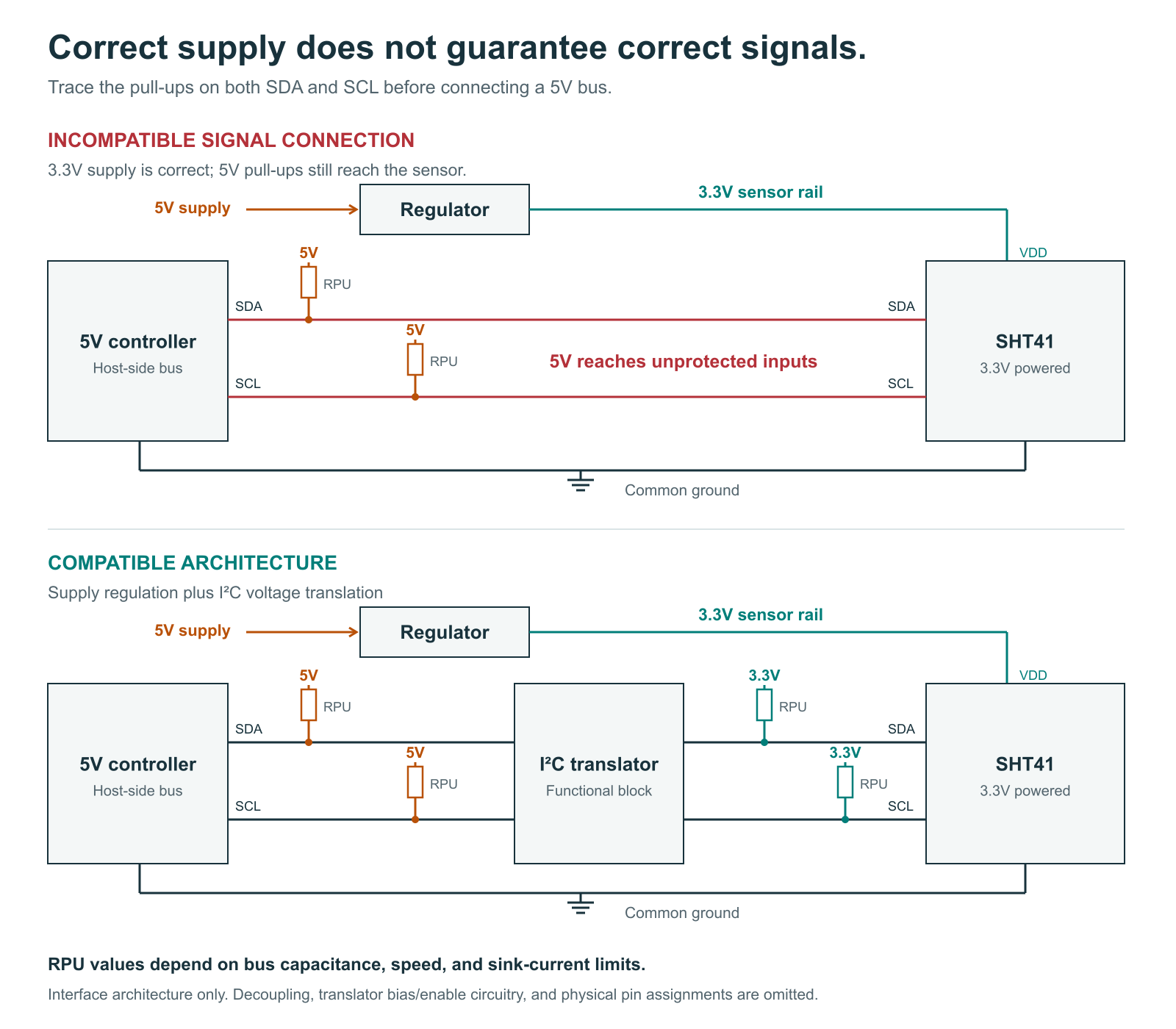
Architecture comparison. Component values, pin assignments, decoupling, and translator biasing must follow the selected components’ documentation.
At a 3.3V sensor supply, direct 5V signals exceed the standard SHT41’s specified pin limit. Lowering the I²C clock cannot fix overvoltage. An acknowledgement at 0x44 does not prove electrical compatibility. SHT4x electrical specifications
How would you add an SHT41 to an Arduino Uno R3?
Return to the controller and display from the opening scenario. The goal is to retain the Uno R3 while adding humidity sensing. For this walkthrough, choose the documented Adafruit SHT41 breakout, product 5776, so the electrical ratings can be checked against an identified board.
Disconnect the display with power off. Connect Uno 5V to breakout VIN, GND to GND, A4 to SDA, and A5 to SCL. Use the designated input, not the regulator-output pin. This wiring follows the manufacturer’s instructions for its breakout on a 5V Arduino. Adafruit Arduino wiring guide
For a custom SHT41-AD1B board, the corresponding architecture is:
5V supply -> suitable regulator -> 3.3V sensor supply

Uno SDA/SCL <-> I2C level translator <-> SHT41 SDA/SCL
5V host-side pull-ups                   3.3V sensor-side pull-ups

Uno GND -------- translator GND -------- sensor GND
Select a translator for the actual voltage domains and bus speed, then implement its biasing and enable circuit. TI’s PCA9306 is one documented option; this block diagram is not a complete PCA9306 schematic. TI PCA9306 documentation
What should you measure before running the code?
Use accessible board test points and a common ground. Check the rails before initiating communication. A multimeter reading taken during bus activity may show an average rather than the true high level.
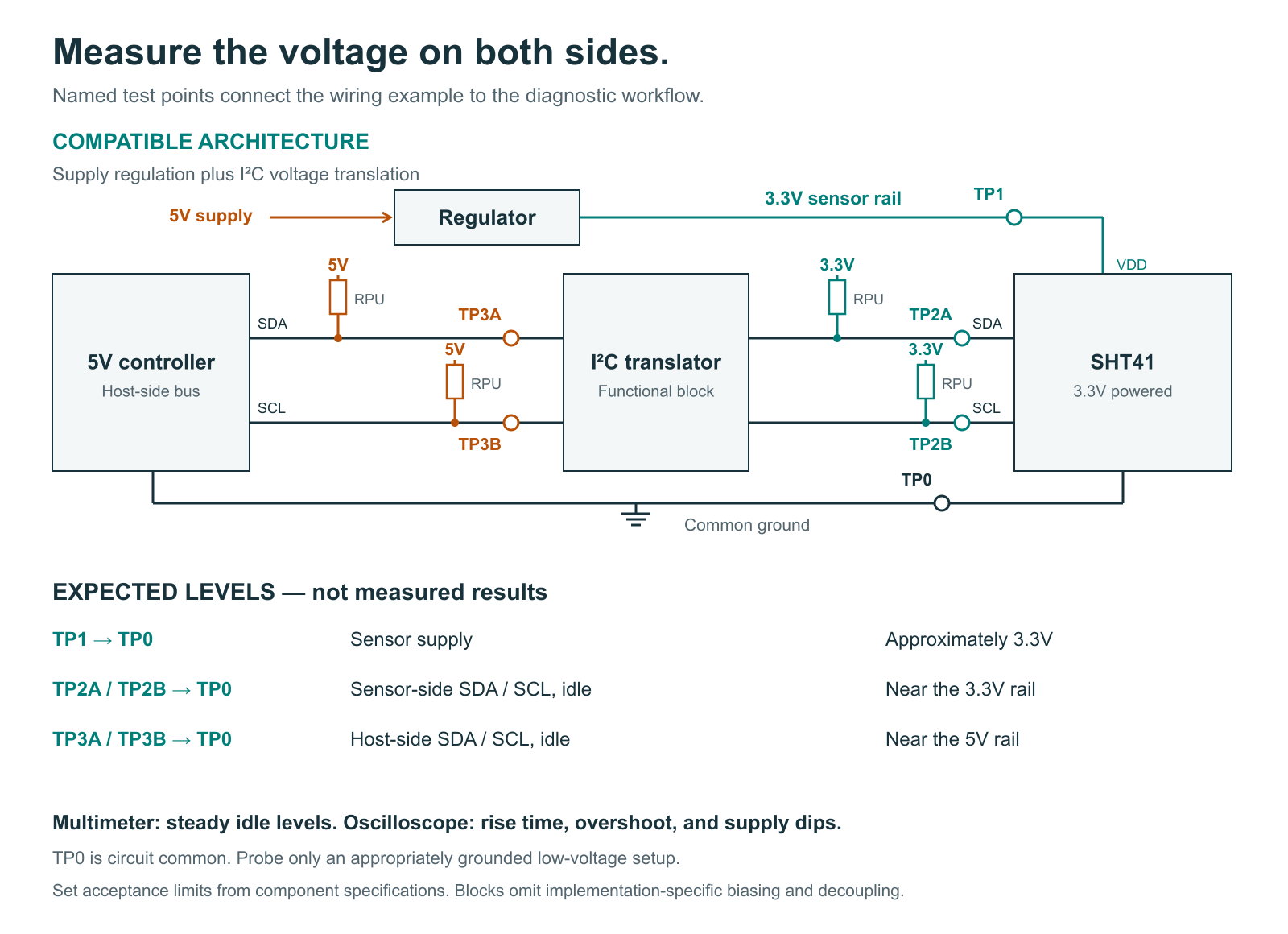
| Test location | Expected in this 5V/3.3V design | If it differs, investigate |
|---|---|---|
| Sensor VDD to GND | Near the intended 3.3V rail | Wrong pin, regulator, wiring |
| Sensor-side SDA/SCL while idle | Near 3.3V | Pull-up rail, translation, stuck lines |
| Host-side SDA/SCL while idle | Near 5V | Pull-ups and translator configuration |
| Supply and bus during transfers | Levels and timing within component specifications | Noise, overshoot, slow edges, loading |
These are design expectations, not measured results or universal acceptance tolerances. Use a multimeter for static checks and an oscilloscope for transaction waveforms. A correct DC reading cannot establish rise-time or overshoot compliance.
How does the diagnostic sketch help isolate a fault?
Once electrical checks pass, select Arduino Uno in the IDE and open Serial Monitor at 115200 baud. The sketch targets Arduino AVR Wire, including its timeout API. It probes 0x44, reads measurements, checks both CRC bytes, and counts successful and failed attempts. Arduino Wire API
Download the complete Arduino diagnostic sketch
View complete Arduino Uno R3 diagnostic sketch
/*
  SHT41 connection diagnostic for Arduino Uno R3 (Arduino AVR Boards core).
  Use a VERIFIED 5V-power AND 5V-logic-compatible breakout, or correctly
  designed regulation and I2C translation. Never connect bare SHT41 to 5V.
  Uno R3: A4 = SDA; A5 = SCL; shared GND. Serial Monitor: 115200 baud.
  Requires Wire timeout APIs in the current Arduino AVR Boards core.
  Original diagnostic example; not Arduino-compiled or hardware-tested.
  References: https://sensirion.com/resource/datasheet/sht4x
              https://github.com/arduino/ArduinoCore-avr/tree/master/libraries/Wire
  No heater commands. Soft reset at startup aborts any previous operation.
*/
#include <Wire.h>

const uint8_t SENSOR_ADDRESS = 0x44;
uint32_t passed = 0, failed = 0;

uint8_t crc8(const uint8_t *data, uint8_t length) {
  uint8_t crc = 0xFF;
  for (uint8_t i = 0; i < length; ++i) {
    crc ^= data[i];
    for (uint8_t bit = 0; bit < 8; ++bit) {
      crc = (crc & 0x80) ? uint8_t((crc << 1) ^ 0x31)
                         : uint8_t(crc << 1);
    }
  }
  return crc;
}

void showCounters() {
  Serial.print(F(" | OK=")); Serial.print(passed);
  Serial.print(F(" FAIL=")); Serial.println(failed);
}

void reportFailure(const __FlashStringHelper *message) {
  ++failed;
  Serial.print(F("ERR ")); Serial.print(message);
  showCounters();
}

// Probe failures and startup failures do not enter measurement counters.
uint8_t transmit(uint8_t command, bool probeOnly = false) {
  Wire.clearWireTimeoutFlag();
  Wire.beginTransmission(SENSOR_ADDRESS);
  if (!probeOnly) Wire.write(command);
  return Wire.endTransmission();
}

void setup() {
  Serial.begin(115200);
  Wire.begin();
  Wire.setClock(100000UL);
  Wire.setWireTimeout(25000UL, true);
  delay(10);
  Serial.println(F("SHT41 diagnostic | 0x44 | 100kHz | no heater commands"));
  const uint8_t vector[] = {0xBE, 0xEF};
  if (crc8(vector, 2) != 0x92) {
    Serial.println(F("STOP CRC self-test failed"));
    while (true) delay(1000);
  }
  Serial.println(F("CRC self-test PASS"));

  uint8_t status = transmit(0, true);
  if (Wire.getWireTimeoutFlag() || status == 5) {
    Serial.println(F("PROBE TIMEOUT: inspect bus and wiring"));
  } else if (status != 0) {
    Serial.print(F("PROBE failed, Wire status=")); Serial.println(status);
  } else {
    Serial.println(F("PROBE ACK at 0x44; this does not identify the chip model"));
  }
  status = transmit(0x94); // Sensor soft reset; not a shared-bus general reset.
  if (Wire.getWireTimeoutFlag() || status != 0) {
    Serial.println(F("RESET failed: verify connections before trusting readings"));
  }
  delay(10);
}

void measureOnce() {
  const uint8_t status = transmit(0xFD); // High repeatability, heater off.
  if (Wire.getWireTimeoutFlag() || status == 5) {
    reportFailure(F("BUS_TIMEOUT")); return;
  }
  if (status == 2) { reportFailure(F("ADDRESS_NACK")); return; }
  if (status == 3) { reportFailure(F("COMMAND_NACK")); return; }
  if (status != 0) {
    Serial.print(F("Wire status=")); Serial.println(status);
    reportFailure(F("BUS_ERROR")); return;
  }
  delay(10); // Exceeds 8.3 ms maximum high-repeatability conversion time.
  Wire.clearWireTimeoutFlag();
  const uint8_t received = Wire.requestFrom(SENSOR_ADDRESS, uint8_t(6));
  if (Wire.getWireTimeoutFlag()) {
    while (Wire.available()) Wire.read();
    reportFailure(F("BUS_TIMEOUT")); return;
  }
  if (received != 6 || Wire.available() != 6) {
    Serial.print(F("Received bytes=")); Serial.println(received);
    while (Wire.available()) Wire.read();
    reportFailure(F("SHORT_READ")); return;
  }
  uint8_t data[6];
  for (uint8_t i = 0; i < 6; ++i) data[i] = uint8_t(Wire.read());
  const bool tempCRC = crc8(data, 2) == data[2];
  const bool rhCRC = crc8(data + 3, 2) == data[5];
  if (!tempCRC || !rhCRC) {
    if (!tempCRC && !rhCRC) reportFailure(F("CRC_BOTH"));
    else if (!tempCRC) reportFailure(F("CRC_T"));
    else reportFailure(F("CRC_RH"));
    return;
  }
  const uint16_t rawT = (uint16_t(data[0]) << 8) | data[1];
  const uint16_t rawRH = (uint16_t(data[3]) << 8) | data[4];
  const float temperature = -45.0f + 175.0f * rawT / 65535.0f;
  const float rhUnclamped = -6.0f + 125.0f * rawRH / 65535.0f;
  const float humidity = constrain(rhUnclamped, 0.0f, 100.0f);
  ++passed;
  Serial.print(F("OK T=")); Serial.print(temperature, 2);
  Serial.print(F("C RH=")); Serial.print(humidity, 2); Serial.print(F("%"));
  if (rhUnclamped != humidity) {
    Serial.print(F(" RH_unclamped=")); Serial.print(rhUnclamped, 2);
  }
  showCounters();
}

void loop() {
  measureOnce();
  delay(1000); // About one sample per second, plus transaction overhead.
}
Example log format, not a measured session:
CRC self-test PASS
PROBE ACK at 0x44; this does not identify the chip model
OK T=24.30C RH=48.20% | OK=1 FAIL=0
ERR ADDRESS_NACK | OK=1 FAIL=1
The last line demonstrates a failed attempt after one successful reading. It is not an expected step in a successful startup.
| Log message | Meaning | Next investigation |
|---|---|---|
OK |
Complete response passed both CRC checks | Repeatability and physical plausibility |
ADDRESS_NACK |
No address acknowledgement | Power, address, wiring, translator state |
COMMAND_NACK |
Command byte not acknowledged | Device identity and transaction integrity |
SHORT_READ |
Fewer than six bytes returned | Read timing and waveform |
CRC_T, CRC_RH, CRC_BOTH |
Returned data failed validation | Connections, noise, signal quality |
BUS_TIMEOUT, BUS_ERROR |
Bus transaction failed | Stuck lines and shared devices |
The sketch sends no heater commands. Each failed measurement increments FAIL once; startup probe/reset failures are separate. Passing the built-in CRC test vector checks that calculation, not the complete hardware connection.
What changes when you reconnect the display?
Power down, check the display’s address and pull-up rail, then reconnect it. Repeat the same sampling sequence with the same wiring length, bus speed, and supply. Record board revisions, runtime, sample count, successes, and each error type for both configurations.
Communication failure rate = FAIL ÷ (OK + FAIL) × 100%. Use measurement attempts only. For illustration, 5 failures in 1,000 attempts means 0.5%; this is an arithmetic example, not a test result. Zero failures describes only the observed run. It does not establish measurement accuracy, long-term reliability, or safe voltage margins.
If failures appear only after the display returns, investigate changed loading, pull-ups, address conflicts, and waveforms before replacing the sensor. This comparison identifies a changed condition; it does not prove the cause by itself.
When is the assembly ready for its application?
The review ends with three decisions: proceed to system validation when documented ratings and measurements agree; revise the interface when power is correct but logic levels are incompatible; or stop until an unidentified board is documented.
If 5V reached an unprotected SHT41-AD1B pin, remove power and correct the circuit. A component that responds after electrical overstress should not automatically be accepted for a product build.
In a display-case monitoring terminal, the next step is enclosure validation: confirm that the sensor samples the intended air and assess heat from the controller and display. Communication success alone cannot establish temperature or humidity accuracy.
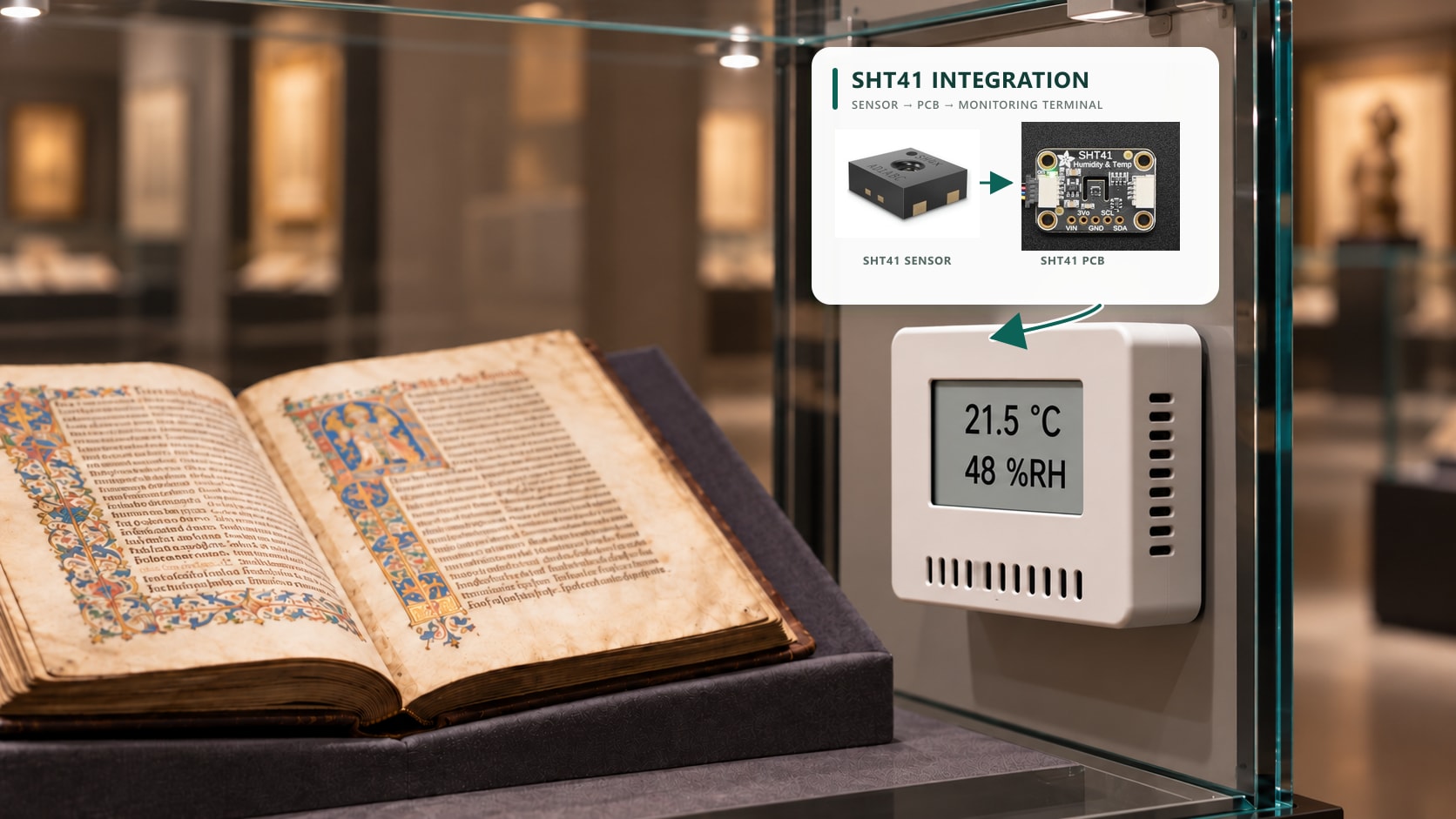
For an unfamiliar module, request its complete model and PCB revision, VIN range, SDA/SCL limits, pull-up rails, and schematic. These details determine whether the 5V connection is acceptable before further firmware work.
Common questions about SHT41 power and wiring
Can I use 3.3V pull-ups with a 5V controller?
Only if the controller’s documented input thresholds recognize that high level and every attached device remains within its pin limits. Check the exact controller and peripherals; a working scan does not prove adequate margin.
Does a response at 0x44 identify an SHT41?
No. An acknowledgement establishes that something answered at that address. Confirm the bill of materials or supplier documentation; the address alone does not identify the model.
Can I power the board through its 3Vo pin?
Do not treat a regulator-output pin as an input without explicit board documentation. Use the designated supply input and follow the instructions for that exact revision.
Is SHT41A-AWSB covered by this wiring example?
No. Its separate datasheet specifies 2.3–5.5V. Review its complete electrical and interface requirements rather than transferring the SHT41-AD1B wiring assumptions to it.
Should I enable the heater during initial debugging?
Keep communication checks separate from heater evaluation. The supplied sketch sends no heater commands. If the application uses the heater, validate its current demand and effects on sampling separately. SHT4x heater specifications
Revision note, October 27, 2026: clarified the model boundary, placed voltage checks before software, and added shared-bus comparison and diagnostic limitations.
Verify the complete sensor assembly
Confirm the board revision, regulator input range, pull-up rails and I²C translation before approving a 5V design. Validate the assembled terminal under its actual power, enclosure and airflow conditions.
Comparing sensors for a new design? Include NYFEA FHT41 in your selection review. Its published supply range is 1.6–5.5V, compared with 1.08–3.6V for the standard Sensirion SHT41-AD1B. This makes supply compatibility a useful starting point for a 5V design. Compare I²C voltage limits, command behavior, accuracy over your operating range, power consumption, package and pinout before selecting either device. Verify compatibility against the current specifications and your board; the similar model names do not establish a drop-in replacement.